
Web Form contact: https://www3.wipo.int/contact/en/area.jsp?area=das is available by clicking on the
| Expand | ||
|---|---|---|
| ||
|
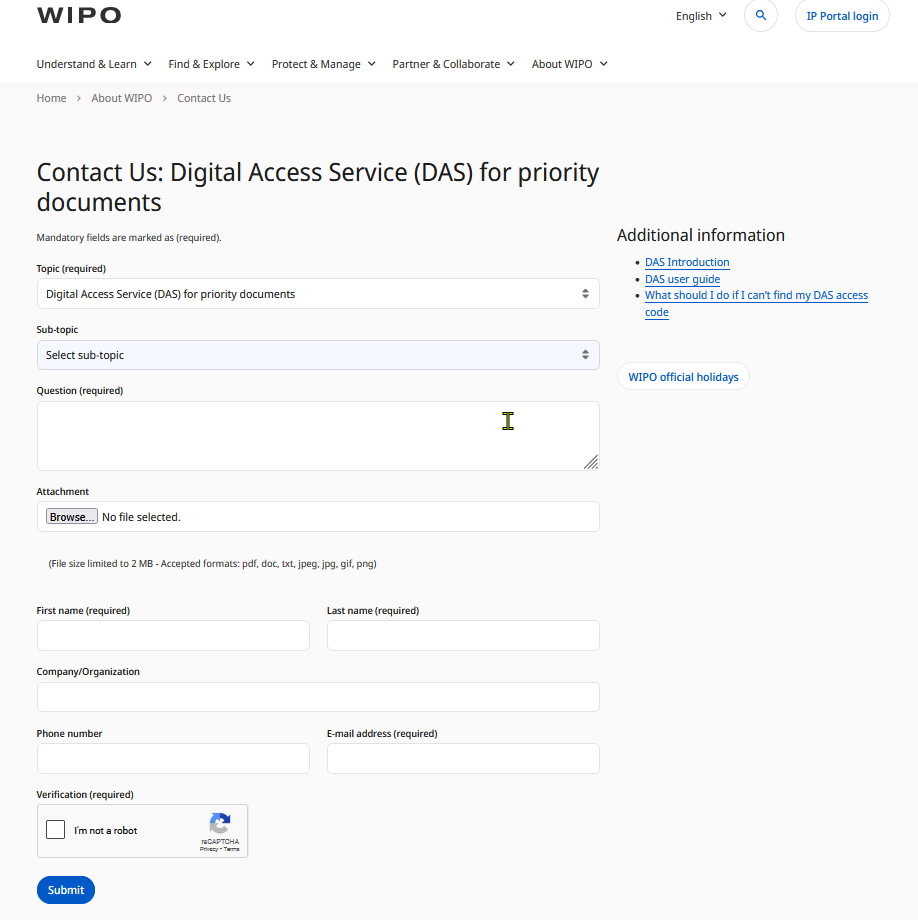
link at the top right corner of any DAS webpage.
| HTML | ||
|---|---|---|
<style> /* ---------- YourModal CSS-only tabs — left-aligned version (unchanged) ---base (applies to ALL modals) ---------- */ .wipodaswipo-tabsmodal { widthposition: 100%fixed; max-widthinset: 900px0; display: flex; align-items: center; /* You can adjust this */ margin: 0; /* Remove centering */ padding: 0; font-family: Inter, Segoe UI, Arial, sans-serif; } .wipodas-tabs [type="radio"] { display:none; } .wipodas-tablabels { display:flex; gap:6px; flex-wrap:wrap; justify-content:flex-start; /* Align left */ } .wipodas-tablabels label { padding:8px 12px; border:1px solid #cbd5e1; border-bottom:none; border-radius:8px 8px 0 0; background:#f1f5f9; cursor:pointer; font-weight:600; } .wipodas-panels { border:1px solid #cbd5e1; border-radius:0 8px 8px 8px; padding:12px; background:#ffffff; margin-top:-1px; } .wipodas-panel { display:none; } #tab1:checked ~ .wipodas-panels #p1, #tab2:checked ~ .wipodas-panels #p2, #tab3:checked ~ .wipodas-panels #p3, #tab4:checked ~ .wipodas-panels #p4, #tab5:checked ~ .wipodas-panels #p5 { display:block; } #tab1:checked ~ .wipodas-tablabels label[for="tab1"], #tab2:checked ~ .wipodas-tablabels label[for="tab2"], #tab3:checked ~ .wipodas-tablabels label[for="tab3"], #tab4:checked ~ .wipodas-tablabels label[for="tab4"], #tab5:checked ~ .wipodas-tablabels label[for="tab5"]{ background:#e2e8f0; } /* --- Simple accordion styling (for <details>) --- */ .wipodas-acc details { border:1px solid #cbd5e1; border-radius:8px; padding:10px 12px; margin:8px 0; background:#f8fafc; } .wipodas-acc summary { cursor:pointer; font-weight:600; outline:none; list-style:none; /* hide default triangle in some browsers */ } .wipodas-acc summary::-webkit-details-marker { display:none; } /* hide marker */ .wipodas-acc summaryjustify-content: center; opacity: 0; pointer-events: none; transition: opacity .18s ease-out; z-index: 9999; } .wipo-modal:target { opacity: 1; pointer-events: auto; } /* Backdrop is an anchor so clicking it navigates to '#' (closing modal) */ .wipo-modal .wipo-backdrop { position: absolute; inset: 0; background: rgba(0,0,0,0.75); content: ""; display: block; } /* Modal content (shared) */ .wipo-modal .wipo-modal-content { position: relative; background: #ffffff; border-radius: 10px; max-width: 90vw; max-height: 90vh; box-shadow: 0 10px 30px rgba(0,0,0,0.4); overflow: hidden; transform: translateY(10px) scale(0.98); transition: transform .18s ease-out; } .wipo-modal:target .wipo-modal-content { transform: translateY(0) scale(1); } /* Image fills modal */ .wipo-modal .wipo-modal-content img { display:block; width:100%; height:auto; } /* Close button */ .wipo-modal .wipo-close { position:absolute; top:10px; right:12px; font-size:22px; text-decoration:none; font-weight:700; color:#fff; background:rgba(0,0,0,0.55); padding:3px 10px; border-radius:8px; } .wipo-modal .wipo-close:hover { background: rgba(0,0,0,0.8); } /* ---------- Hover preview over the words ---------- */ .wipo-hover { position: relative; display:inline-block; } .wipo-hover .wipo-hovercard { position: absolute; top: 1.6em; left: 0; display: none; background: #ffffff; border:1px solid #cbd5e1; border-radius:8px; box-shadow: 0 6px 18px rgba(0,0,0,0.25); padding: 6px; z-index: 50; max-width: 520px; /* adjust preview size */ } .wipo-hover .wipo-hovercard img { display:block; width:100%; height:auto; border-radius:6px; } .wipo-hover:hover .wipo-hovercard { display:block; animation: wipoFade .15s ease-out; } /* Small pointer arrow */ .wipo-hover .wipo-hovercard::before { content: "▸"; position:absolute; displaytop:inline-block-6px; left:14px; margin-right:8pxborder-width: 6px; border-style: solid; transition:transform .15s easeborder-color: transparent transparent #ffffff transparent; } .wipodas-acc details[open] summary::before { transform:rotate(90deg /* Animation */ @keyframes wipoFade { from { opacity:0; transform: translateY(4px) scale(0.995); } .wipodas-acc .acc-body to { margin-top:8px; opacity:1; transform: translateY(0) scale(1); } } /* Dark mode support (inherits your palette) */ @media (prefers-color-scheme: dark) { .wipodaswipo-tablabels labelmodal .wipo-modal-content { background:#0b1220; color:#ffd700; } border-color:#334155; } .wipodas-panels { .wipo-hover .wipo-hovercard { background:#0b1220; color:#ffd700; border-color:#334155; } .wipodaswipo-acc detailshover .wipo-hovercard::before { background:#0b1220; color:#ffd700; border-color:#334155; border-color: transparent transparent #0b1220 transparent; } } </style> <div class="wipodas-tabs"> <input type="radio" name="wipodas" id="tab1" checked> <input type="radio" name="wipodas" id="tab2"> <input type="radio" name="wipodas" id="tab3<!-- Text with hover preview + click-to-open modal --> <p> A <span class="wipo-hover"> <input type="radio" name="wipodas" id="tab4"> <input type="radio" name="wipodas" id="tab5"> <div class="wipodas-tablabels"> <label for="tab1">Overview</label> <a href="#wipo-modal" style="color:#005b9e; font-weight:600; cursor:pointer;">Web contact Form</a> <span class="wipo-hovercard" aria-hidden="true"> <label for="tab2">Participating Offices</label> <label for="tab3">Documents</label> <label for="tab4">Unavailability</label> <label for="tab5">Lost Codes</label> </div> <div class="wipodas-panels"> <!-- Tab 1: Overview --> <div id="p1" class="wipodas-panel wipodas-acc <img src="https://confluence.wipo.int/confluence/download/attachments/1640667157/image-2025-11-10_9-52-53.png?api=v2" alt=""> <details open></span> <summary>What is WIPO DAS?</summary>span> is available by clicking on the <div"contact class="acc-body"> <p>The WIPO Digital Access Service (“DAS”), available at us" link at the top right corner of any WIPO DAS webpage (<a href="https://wwwwww3.wipo.int/dascontact/en/">https://www.wipo.int/das/en/</a>, allows you to meet requirements for providing priority and similar documents in respect of participating Offices, without the need to obtain and send multiple certified paper copies of an application.</p> <p>Instead, you ask the Office where you are claiming priority (“Office of Second Filing” or OSF) to download a copy of the document directly from a digital library, normally held by or on behalf of the Office where the earlier application was filed from which priority is claimed (“Office of First Filing” or OFF).</p> </div> </details> <details> <summary>Security and Permissions</summary> <div class="acc-bodyarea.jsp?area=das">WIPO DAS Support contact form</a>). </p> <p> While filling the form, please select which <span class="wipo-hover"> <a href="#wipo-modal2" <p>DAS provides a secure, trusted mechanism which allows Offices both to transmit and to access unpublished documents with confidence that the transmission has been permitted by the applicant or other authorized person.</p> <p>It is essential that users properly understand what is required to give permission for this transfer. Because the system is designed to work between pairs of Offices, which may have no other working relationship, there are steps involved, which are different from, or additional to those in other priority document exchange systems in operation between certain Offices.</p> </div> </details> </div> <!-- Tab 2: Participating Offices --> <div id="p2" class="wipodas-panel wipodas-acc"> <details open> <summary>Current Participation</summary> <div class="acc-bodystyle="color:#005b9e; font-weight:600; cursor:pointer;">sub-topic</a> <span class="wipo-hovercard" aria-hidden="true"> <p>An up-to-date list of participating Offices is maintained on the WIPO DAS website at: <a href<img src="https://wwwconfluence.wipo.int/dasconfluence/en/news">https://www.wipo.int/das/en/news</a></p> <p>As of November 1, 2025, there are 50 IP Offices participating in WIPO DAS. Other Offices are at various stages of preparation to join the system and are expected to join in the future.</p> download/attachments/1640667157/image-2025-11-10_9-53-31.png?api=v2" alt=""> </div>span> </details> span> matches your request; it <details> will help identify the type <summary>Office-Specific Information</summary> <div class="acc-body"> <p>The participating Office’s websites also provide useful DAS information relevant toof support that particularis Office. Please see “New Office Participation” on the WIPO website for announcements and details.needed. </p> </div> </details> </div> <!-- Tab 3: DocumentsMODAL 1 --> <div id="p3wipo-modal" class="wipodas-panel wipodas-acc"> <details open> <summary>Scope of Documents</summary> wipo-modal" role="dialog" aria-modal="true" aria-label="Contact Us preview"> <a class="wipo-backdrop" href="#" aria-label="Close dialog"></a> <div class="accwipo-modal-bodycontent"> <p>The service is intended for use with documents related to patents, utility models, industrial designs and trademarks.</p> <p>At present, the service is operational for exchange of patent, utility model and design priority documents.</p> </div> </details> <details> <summary>OFF Policy Differences</summary> <div class="acc-body"> <p>The scope of documents which can be made available also depends on the policy of the Office of First Filing.</p><a href="#" class="wipo-close" aria-label="Close">✕</a> <p>Some Offices will allow any patent application filed at their Office to be entered into the system; other Offices offer the service only for a limited range of applications, such as those which have been filed in electronic form.</p> <p>The relevant scope for each participating Office is outlined on WIPO’s website: <a href<img src="https://wwwconfluence.wipo.int/dasconfluence/en/participating_offices.html">https://www.wipo.int/das/en/participating_offices.html</a></p> <p>The service will be extended to trademarks once participating Offices have made the necessary changes.</p> download/attachments/1640667157/image-2025-11-10_9-52-53.png?api=v2" alt="Contact Us screenshot"> </div> </details> </div> <!-- TabMODAL 4:2 Unavailability --> <div id="p4wipo-modal2" class="wipodas-panel wipodas-acc"> <details open> <summary>System Dependencies & Queuing</summary> wipo-modal" role="dialog" aria-modal="true" aria-label="Sub-topic preview"> <a class="wipo-backdrop" href="#" aria-label="Close dialog"></a> <div class="accwipo-modal-bodycontent"> <p>The DAS system depends on the IT systems of many different Offices, over which the International Bureau has no control.</p> <p>If a library in one Office is temporarily unavailable, requests are queued until systems are restored.</p> <p>This may cause delays, so it is important to register the application and take the required steps as early as possible.</p> </div> </details> <details> <summary>Impact on Retrievals & Calendar</summary> <div class="acc-body"> <p>In extreme cases, the Office of Second Filing may be temporarily unable to retrieve your application, but you should still be given an opportunity to provide a paper certified copy if needed.</p> <p><a href<a href="#" class="wipo-close" aria-label="Close">✕</a> <img src="https://confluence.wipo.int/confluence/spacesdownload/dascgattachments/pages/1590497022/4.-+Calendar+of+network+disruptions">Network disruptions</a></p> </div> </details> </div> <!-- Tab 5: Lost Codes --> <div id="p5" class="wipodas-panel wipodas-acc"> <details open> <summary>How to Recover Access Codes</summary> <div class="acc-body"> <p>If you lose your DAS access code for an earlier application filed at CN, EP, FI, JP, KR, NZ or US, please contact the Office where you filed that application.</p> <p>If the application was filed at another participating Office, contact the PCT eServices Help Desk for the access code to be resent to the e-mail address you registered for DAS purposes.</p> </div> </details> 1640667157/image-2025-11-10_9-53-31.png?api=v2" alt="Sub-topic screenshot"> </div> </div> </div> | ||
| Section | ||
column
|
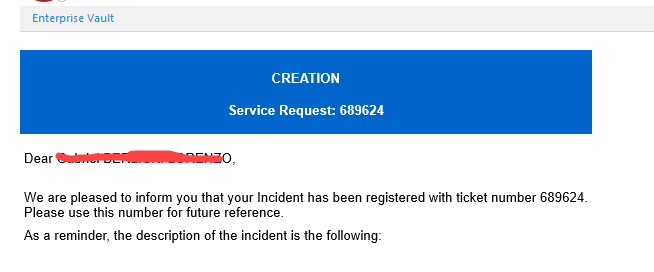
On reception of your email, a ticketing system will issue an incident number and will send an automatic reply to the source email address like this:
| Note |
|---|
In some cases the automatic initial message is not immediate as we have to add the source email address to the "contact list" of verified addresses (this is done manually once we detect the pending request). After that is donecorrected in the system, for any new request, the notification will be automatically sent to your email. |
After the ticket is issued, it will be assigned to an agent in out team to review and help with the resolution. If the information is not clear you will be contacted, otherwise you will receive a new notification when the issue is resolved like this:
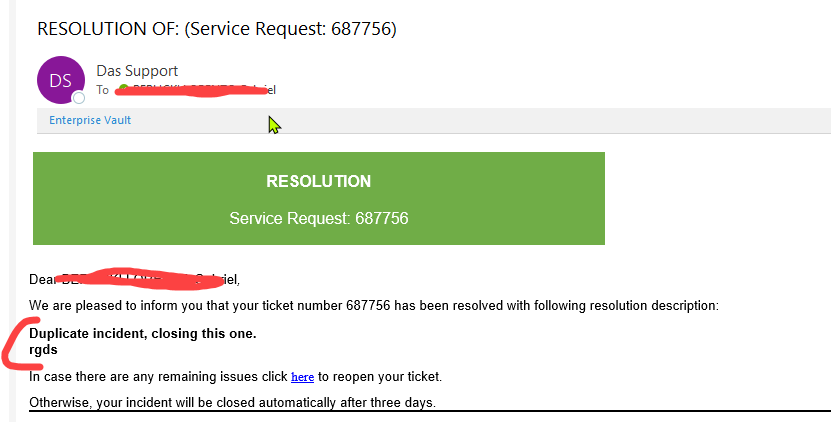
The email will include a message with the details of how the issue was resolved.
...
| Children Display |
|---|