This Wiki space is provided and administrated by the WIPO IP Office Business Division (IPOBSD). It contains up-to-date information about IP Office Suite and related modules and information resources for the benefit of Industrial Property Offices (IPOs).
The information is categorized to serve various user groups including management, examiners, IT professionals as well as the general public. The overview section presents high-level introductory information about the products and their functions along with the cooperation framework under which the products can be deployed and used by the member states. The rest of the Wiki space contains substantial information and resources for the use, deployment and administration of products which is available for registered users. The Wiki further maintains a restricted section for WIPO staff to administrate the work in progress related to the products.
<style>
/* --- 4-tab CSS-only template (Confluence HTML macro friendly) --- */
.tabs4 {
width: 100%;
max-width: 900px;
margin: 0;
padding: 0;
font-family: Inter, Segoe UI, Arial, sans-serif;
position: relative;
}
/* Hide radios */
.tabs4 [type="radio"] { display: none; }
/* Tab labels bar */
.tabs4 .tablabels {
display: flex;
gap: 6px;
flex-wrap: nowrap; /* keep on one line */
overflow-x: auto; /* scroll if narrow */
white-space: nowrap;
scrollbar-width: thin;
}
.tabs4 .tablabels::-webkit-scrollbar { height: 6px; }
.tabs4 .tablabels label {
padding: 8px 12px;
border: 1px solid #cbd5e1;
border-bottom: none;
border-radius: 8px 8px 0 0;
background: #f1f5f9;
cursor: pointer;
font-weight: 600;
flex-shrink: 0;
}
/* Panels container */
.tabs4 .panels {
border: 1px solid #cbd5e1;
border-radius: 0 8px 8px 8px;
padding: 12px;
background: #ffffff;
margin-top: -1px;
position: relative;
}
/* Panels hidden by default */
.tabs4 .panel { display: none; }
/* Show selected panel */
#t4-1:checked ~ .panels #p4-1,
#t4-2:checked ~ .panels #p4-2,
#t4-3:checked ~ .panels #p4-3,
#t4-4:checked ~ .panels #p4-4 { display: block; }
/* Highlight active tab label */
#t4-1:checked ~ .tablabels label[for="t4-1"],
#t4-2:checked ~ .tablabels label[for="t4-2"],
#t4-3:checked ~ .tablabels label[for="t4-3"],
#t4-4:checked ~ .tablabels label[for="t4-4"] { background: #e2e8f0; }
/* --- Optional accordion styling inside panels --- */
.tabs4 .acc details {
border: 1px solid #cbd5e1;
border-radius: 8px;
padding: 10px 12px;
margin: 8px 0;
background: #f8fafc;
}
.tabs4 .acc summary {
cursor: pointer;
font-weight: 600;
outline: none;
list-style: none;
}
.tabs4 .acc summary::-webkit-details-marker { display: none; }
.tabs4 .acc summary::before {
content: "▸";
display: inline-block;
margin-right: 8px;
transition: transform .15s ease;
}
.tabs4 .acc details[open] summary::before { transform: rotate(90deg); }
.tabs4 .acc .body { margin-top: 8px; }
/* --- Prev/Next arrows (CSS-only via labels) --- */
.tabs4 .arrow {
position: absolute;
top: 8px;
font-size: 20px;
padding: 4px 8px;
cursor: pointer;
color: #555;
opacity: 0.55;
user-select: none;
border-radius: 8px;
background: #f1f5f9;
border: 1px solid #cbd5e1;
}
.tabs4 .arrow:hover { opacity: 1; }
.tabs4 .left { left: -10px; }
.tabs4 .right { right: -10px; }
/* Hidden by default */
.tabs4 .left, .tabs4 .right { display: none; }
/* Show appropriate prev arrow */
#t4-2:checked ~ .left.prev2,
#t4-3:checked ~ .left.prev3,
#t4-4:checked ~ .left.prev4 { display: inline-block; }
/* Show appropriate next arrow */
#t4-1:checked ~ .right.next1,
#t4-2:checked ~ .right.next2,
#t4-3:checked ~ .right.next3 { display: inline-block; }
/* Dark mode */
@media (prefers-color-scheme: dark) {
.tabs4 .tablabels label {
background:#0b1220; color:#ffd700; border-color:#334155;
}
.tabs4 .panels {
background:#0b1220; color:#ffd700; border-color:#334155;
}
.tabs4 .acc details {
background:#0b1220; color:#ffd700; border-color:#334155;
}
.tabs4 .arrow {
background:#0b1220; color:#ffd700; border-color:#334155;
}
}
</style>
<div class="tabs4" role="region" aria-label="Tabbed content">
<!-- Radios -->
<input type="radio" name="tabs4" id="t4-1" checked>
<input type="radio" name="tabs4" id="t4-2">
<input type="radio" name="tabs4" id="t4-3">
<input type="radio" name="tabs4" id="t4-4">
<!-- Labels (rename as needed) -->
<div class="tablabels">
<label for="t4-1">WIPO SUITE</label>
<label for="t4-2">Tab Two</label>
<label for="t4-3">Tab Three</label>
<label for="t4-4">Tab Four</label>
</div>
<!-- Prev/Next arrows (focus + Enter/Space to switch) -->
<label class="arrow left prev2" for="t4-1" aria-label="Previous tab">←</label>
<label class="arrow left prev3" for="t4-2" aria-label="Previous tab">←</label>
<label class="arrow left prev4" for="t4-3" aria-label="Previous tab">←</label>
<label class="arrow right next1" for="t4-2" aria-label="Next tab">→</label>
<label class="arrow right next2" for="t4-3" aria-label="Next tab">→</label>
<label class="arrow right next3" for="t4-4" aria-label="Next tab">→</label>
<!-- Panels (put your content inside) -->
<div class="panels">
<div id="p4-1" class="panel acc">
<!-- Example accordion (optional) -->
<details open>
<summary>Section A (Tab 1)</summary>
<div class="body">
<p>The WIPO IP Office Suite is a group of software applications that IP Offices can use to support the processing of applications for IP rights by establishing an e-registry, controlling workflow processes and business rules, and providing online services to local and international users. The overall objective is to deliver operational efficiencies and improve quality of service.</p>
<p>The WIPO IP Office Suite, or parts of it, is currently in operation in more than 80 IP offices in all regions of the world. For more than 15 years, WIPO has been offering this service to IP offices of developing countries as part of the technical assistance program.</p>
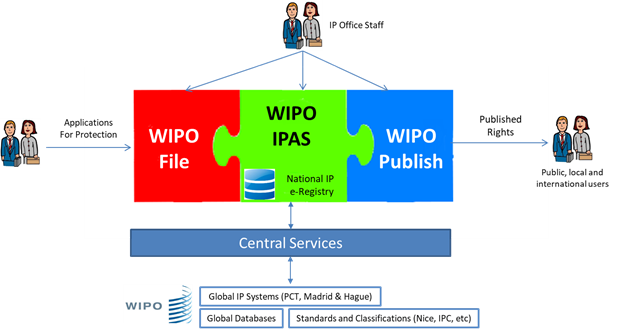
<p>The suite is made up of three complementary systems: WIPO File, WIPO IPAS and WIPO Publish, supported by a Central Services component that provides for efficient and reliable data exchange to interconnect IP offices with global IP systems and data. </p>
</div>
</details>
</div>
<div id="p4-2" class="panel acc">
<details open>
<summary>Section A (Tab 2)</summary>
<div class="body">
<p><!-- TODO: Add your content for Tab 2 here. --></p>
</div>
</details>
</div>
<div id="p4-3" class="panel acc">
<details open>
<summary>Section A (Tab 3)</summary>
<div class="body">
<p><!-- TODO: Add your content for Tab 3 here. --></p>
</div>
</details>
</div>
<div id="p4-4" class="panel acc">
<details open>
<summary>Section A (Tab 4)</summary>
<div class="body">
<p><!-- TODO: Add your content for Tab 4 here. --></p>
</div>
</details>
</div>
</div>
</div>
The WIPO IP Office Suite is a group of software applications that IP Offices can use to support the processing of applications for IP rights by establishing an e-registry, controlling workflow processes and business rules, and providing online services to local and international users. The overall objective is to deliver operational efficiencies and improve quality of service.
The WIPO IP Office Suite, or parts of it, is currently in operation in more than 80 IP offices in all regions of the world. For more than 15 years, WIPO has been offering this service to IP offices of developing countries as part of the technical assistance program.
The suite is made up of three complementary systems: WIPO File, WIPO IPAS and WIPO Publish, supported by a Central Services component that provides for efficient and reliable data exchange to interconnect IP offices with global IP systems and data.
The WIPO IP Office Suite is developed and owned by WIPO and is offered to IP offices of WIPO member states free of charge as part of WIPO’s technical assistance services. Before starting a project, WIPO and the IP Office (or responsible Ministry) sign a cooperation agreement that sets out the shared responsibility for implementation, terms and conditions for the use of WIPO software systems, confidentiality and other provisions.
Projects are organized according to a shared responsibility model, with the aim of assisting IP offices to increase their capacities as much as possible using WIPO software solutions and to create projects with long-term sustainability.
Projects are initiated based on a request by the IP office concerned. This is followed by an assessment of the needs, capabilities and suitability of WIPO software solutions for the IP offices. If both parties agree to initiate the project, a project plan is created to clarify the roles and responsibilities, resource requirements and expected outcomes. The assessment process covers the critical pre-requisites for the project to succeed, as described below:
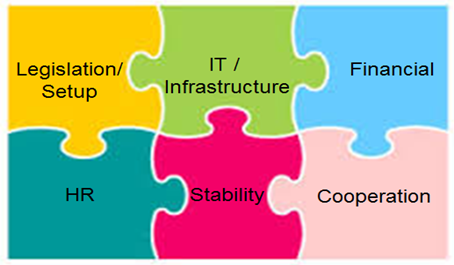
- Financial: availability of capital and operating budget to start and maintain the project. Capital investment may be required up front for IT infrastructure and equipment while operating expenses are typically required for upgrades, spare parts…etc.
- Legislation: IP laws and regulations should be in place and minimum functioning IPO organization with respective staff should be present. For online services, an appropriate legislative framework needs to be in place (electronic communications law, or similar).
- Information Technologies: depending on the project and systems to be deployed, the appropriate hardware, networking, security and physical infrastructure need to be in place. The need for good internet connectivity has become now a priority so that offices can provide online services and engage in remote support and training activities.
- Human Resources: Local IT personnel for the day-to-day support of systems and infrastructure. WIPO has a profile of skills needed for local administrators who should basically have knowledge of IT and network administration activities.
- Stability: stable management and low turn-over of staff and local IT resources are important for project continuity.
- Cooperation with WIPO: The conclusion of the cooperation agreement prior to commencing the project.